New Year Offer: first 1000 users get lifetime 50% off. Use Code "NewYear2026"

Start free trial
AI Cues for High-Stakes Conversations

Stay sharp in every call. Say the right thing.

Real-time guidance for what to say next. Built for real conversations, not rehearsed scripts.

No card required 7-day free trial Cancel anytime
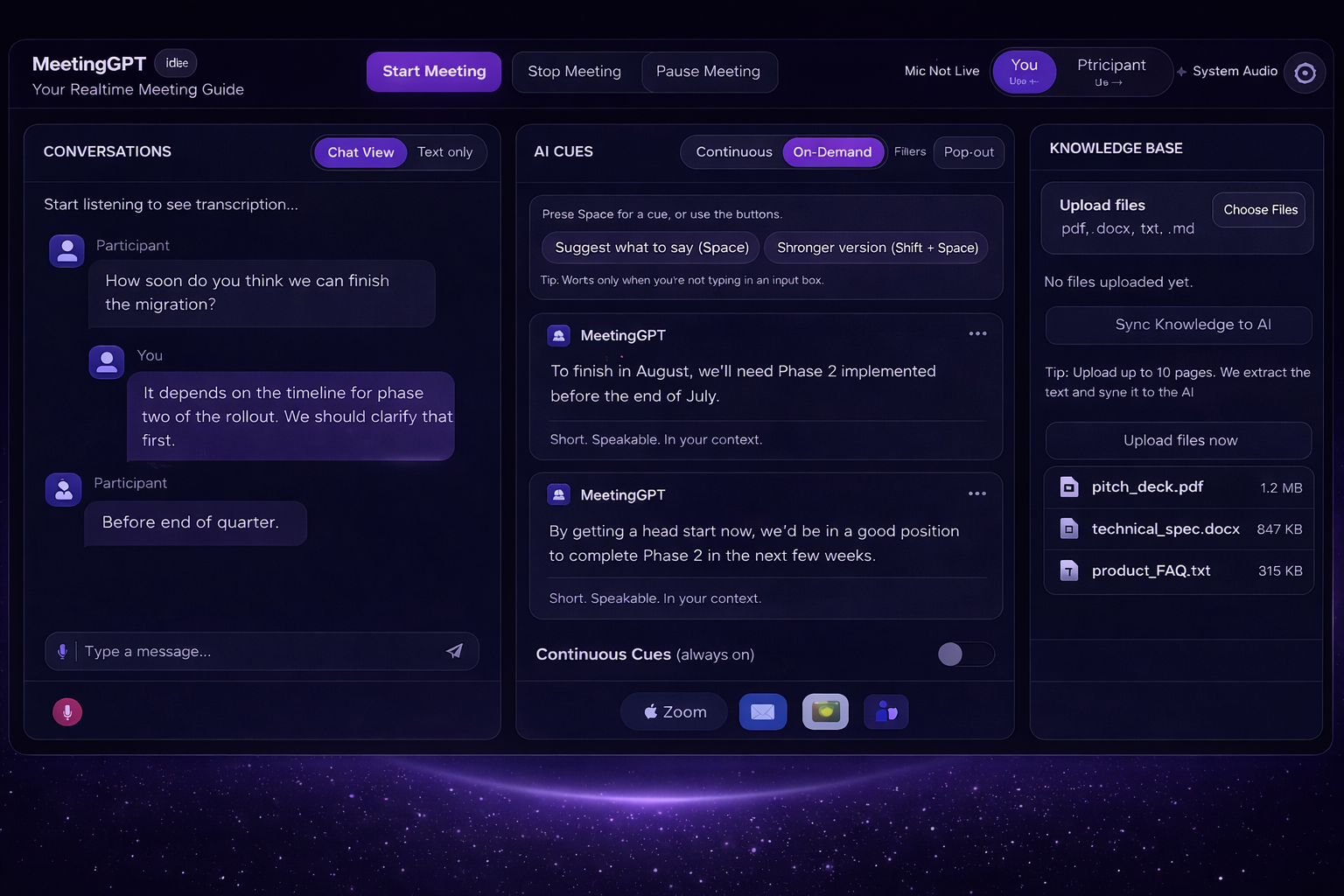
MeetingGPT interface screenshot
Realtime cues, Not post-call notes
Short lines you can say during your meetings.
Built for conversations where outcomes matter.
Under 2 min
Setup to first cue
Realtime
Suggestions in-call

Trusted by professionals at

TechCorp
SalesHub
VentureCo
ClientFirst
GrowthLabs

The hardest part is not the meeting. It’s the moment you freeze.

One objection. One surprise question. One pause that lasts too long. That’s how deals slip, trust breaks, and confidence takes a hit.

Moment 1

The Blank Moment

You hear the question, your mind goes blank. The other person fills the silence.

Cost: You lose Credibility
Moment 2

Late Perfect Answer

The right response appears few minutes after the call ends. It’s painful. And useless.

Cost: You lose Momentum
Moment 3

Objections Pile Fast

Pricing, timelines, competitors, doubt. All come at once.

Cost: You lose Deal
Moment 4

Pre Meeting Pressure

Every call feels like a test you have to prepare for. And pre-call stress builds.

Cost: You get Stressed

Live moment

Auto-scroll

Client says

Your pricing feels high. Why shouldn’t we pick a cheaper tool?

MeetingGPT Cue

Totally fair. If budget is the constraint, let’s start smaller, prove ROI in two weeks, then expand only if it’s working.

Client says

Can you share a timeline for rollout and what success looks like in the first month?

MeetingGPT Cue

Yes. Two-week pilot: week one setup and training, week two live usage. We track adoption, time saved, and outcomes. Then we decide the rollout.

Client says

This looks interesting, but it’s not that urgent for us right now.

MeetingGPT Cue

Got it. If I may ask, what needs to change for you to adopt this solution?

Client says

Not like that, I'm travelling over this month fo work, and then I have a few internal deliverables.

MeetingGPT Cue

Sure. How about, we run a tiny pilot and keep it low-friction? You could just intro me to you team. We'll get you some real insights before we decide if this is worth your time?

Client says

Yeah, we could do that. Send me an email after this call, and I will make the intro.

Real objections. Clean replies. No drama. Just traction.

Never reach for words mid-call. Turn pressure into clarity, in real time.

Short cues. Meaningful conversations. Better outcomes.

On-demand

On Demand. Get a speakable line.

When pressure spikes, you don’t need a paragraph. You need one clean sentence that you can say. Just press the "Space Bar".

MeetingGPT Cue

If timeline is tight, we can lock milestones today and run a fast pilot while legal reviews run in parallel.

Short, Speakable, In your context.

Knowledge base

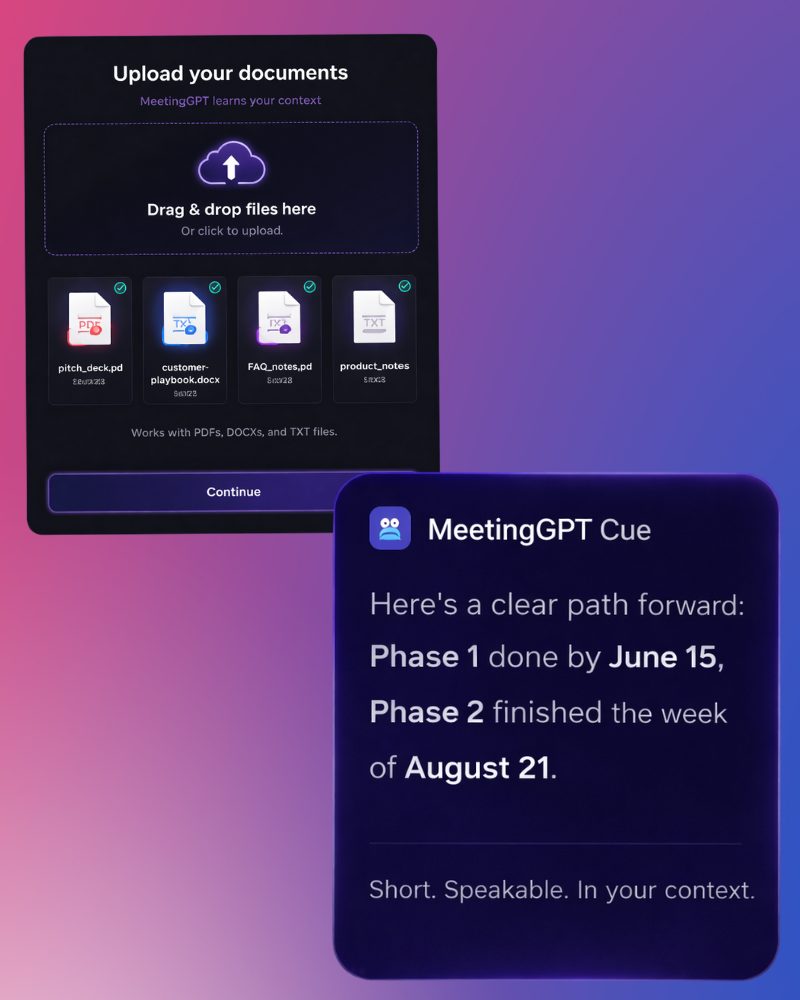
Upload Documents. Get contextual cues.

Upload your context so cues speak your story.

📄

Works with

PDFs, docs, notes

Cues match your real story.

Result: teach AI your context

Goal

Context aware

To the point. In your context.

Result: you win conversations
Try it on a real call

No card required.

Feature visuals

See it in motion. Feel the difference.

Watch how the conversation shifts when you always have a clean next sentence ready.

Real call: objection to close the deal

Pricing pushback handled in real time

1:32

Real-time cues

Cues appear as the conversation moves.

On-message

Consistent with your uploaded context.

Short and speakable

No essays. Just what you can say.

Pre-call setup takes under 2 minutes.

Upload context, join the call, get cues. That’s it.

Setup flow visuals

Upload context, join the call, get cues in real time.

1

Upload your knowledge. Build context.

Drop in your deck, documents or case studies. MeetingGPT stays on your story.

Example

pitch_deck.pdf

Example

sales_playbook.docx

2

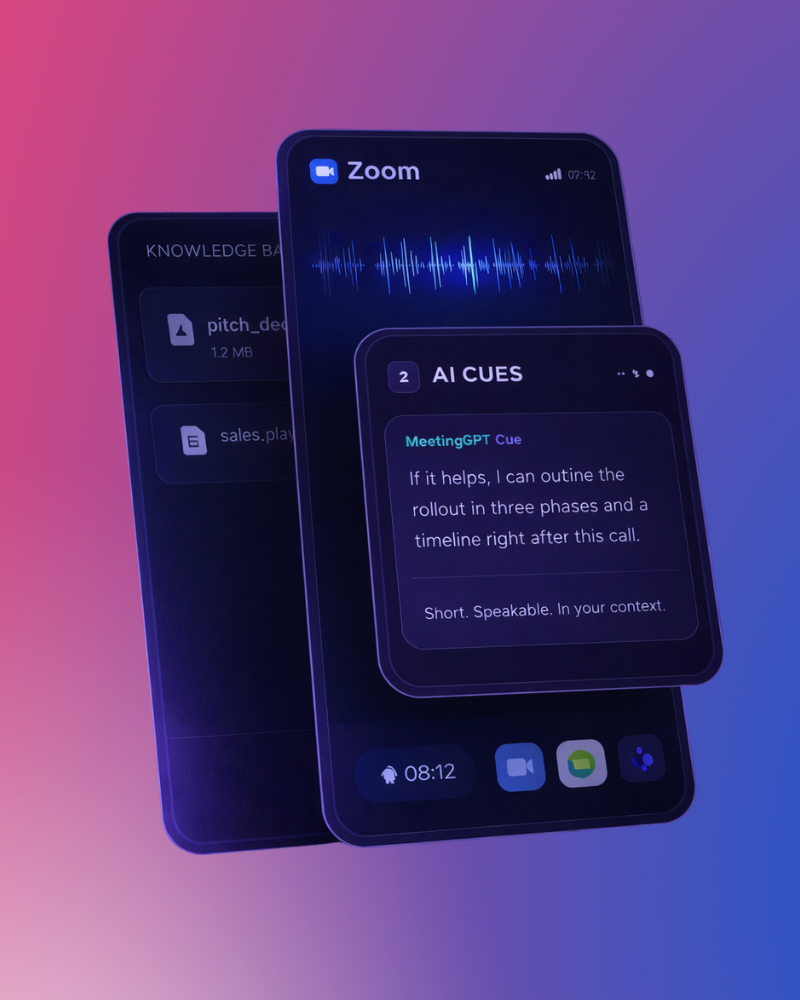
Join your call. Share call audio.

Zoom, Meet, Teams. If you can hear it, you can get guided through it.

Zoom Google Meet Microsoft Teams
3

Get cues. Answer comfidently.

Get cues on-demand. Or get continuous cues to keep you one step ahead.

MeetingGPT Cue

If it helps, I can outline the rollout in three phases and share a timeline right after this call.

Short. Speakable. In your context.
Start free trial

No card required.

Built for real conversations. Not ideal ones.

Different roles. Same pressure. One calm way through it.

For Sales Leaders

High-stakes deals. Zero room to freeze.

Live objections on pricing, competitors, and timelines. One pause too long, and momentum is gone.

MeetingGPT Cue

If budget is the concern, we can start with a smaller scope, prove ROI fast, and expand only if it’s working.

Result: Confidence stays high. Deals keep moving.

For Founder & Investors

Important calls. Too much on the line.

Investor updates, board meetings, partner discussions. You need clarity, not rambling product explanations.

MeetingGPT Cue

Let me zoom out for a second. The core priority this quarter is execution speed, and this decision directly supports that.

Result: Clear thinking. Strong presence.

For Interviews & Internal Reviews

Tough questions. No second chance.

“Tell me about a failure.” “Why should we hire you?” Silence feels louder and right answers matter.

MeetingGPT Cue

One challenge I faced was prioritization. I learned to simplify decisions, act faster, and communicate trade-offs clearly.

Result: Calm answers. Strong impression.
Try it in your next call

No scripts. No noise. Just the next right sentence.

The difference shows up fast. Right in the call.

Less scrambling. Fewer pauses. More control when it matters.

60%

Faster responses

Users report answering objections quicker without long pauses or filler.

Confidence in-call

Conversations feel calmer and more controlled, even under pressure.

−40%

Post-call regret

Fewer “I should’ve said that” moments after meetings end.

Based on feedback across sales, leadership, and interview use cases.

What it feels like to use. In their words.

Real people. Real pressure. Real calm.

“I don’t panic when an objection comes anymore. I just glance, say the line, and keep going.”

Steve Collins

Steve Collins

Sales Lead · B2B SaaS

“It feels like someone calmer than me is sitting in the call, nudging me in the right direction.”

Myra Miller

Myra Miller

Founder · Fintech startup

“The biggest change is after the call. No more thinking in my head, what if I said this.”

Jake Thompson

Jake Thompson

Product Manager · Enterprise team

Try it on a real call

No scripts. No pressure. Just support when you need it.

Why this feels different. Side by side.

Most tools help after the call. MeetingGPT helps when you’re still in it.

Works during the call
MeetingGPT Yes, Real-time
AI Notes No
Scripts No
Memory No
Real-time objections
MeetingGPT Handled
AI Notes Missed
Scripts Static
Memory Unreliable
Context awareness
MeetingGPT Upload Documents
AI Notes Partial
Scripts Manual
Memory Guesswork
Speakable responses
MeetingGPT Contextual Sentences
AI Notes Long summaries
Scripts Awkward
Memory Inconsistent
Interrupts your flow
MeetingGPT Never
AI Notes Sometimes
Scripts Often
Memory Often
Designed for pressure
MeetingGPT Yes
AI Notes No
Scripts No
Memory No
Try MeetingGPT live

No rehearsals. No scripts. Just help when it matters.

Simple pricing. Built for real calls.

No seats. No long-term lock-in. Pay for calm, not complexity.

Starter

For trying it on real calls

Free

No card required

  • • On-demand cues
  • • 3 calls per month
  • • Upload Knowledgebase upto 100 words
Talk to us
Most used

Pro

For people who run important calls

$12/month

Billed monthly. Cancel anytime.

  • • Continuous + On-demand cues
  • • Unlimited calls
  • • Upload Knowledgebase upto 2000 words
  • • Faster, sharper cues
Start Pro trial

Team

For enterprises & their teams

Enterprise

Based on usage

  • • Everything in Pro
  • • Team-wide consistency
  • • Priority support
Talk to us
Pay annually to get 20% discount.

Questions, answered. Before you ask them.

Short, honest answers. No fine print.

Does MeetingGPT listen to my calls?

It listens only to generate cues in real time. Nothing is recorded or stored.

Will the cues sound robotic?

No. Cues are short, neutral, and phrased to sound like something a calm human would actually say.

What tools does it work with?

Zoom, Google Meet, and Microsoft Teams. If you can hear the call, MeetingGPT can guide you.

Do I need to read or type during the call?

No typing. Just glance when you need help, say the line, and stay present in the conversation.

Is this only for sales calls?

No. Founders, product leaders, recruiters, managers, and consultants use it for any high-pressure conversation.

How fast does it actually respond?

Cues appear in seconds. Fast enough to help you respond without breaking the flow of the call.

Will it distract me during important moments?

No. It stays quiet unless you need it. You control when to glance and when to ignore it.

Can I upload my own documents and scripts?

Yes. You can upload decks, notes, playbooks, and talking points so cues stay on-message.

Does it replace preparation?

No. It reduces pressure during the call. Think of it as support, not a shortcut.

What if the cue isn’t perfect?

You’re always in control. Use it as-is, tweak it, or ignore it completely.

Can I turn it off mid-call?

Yes. One click. No disruption. You can switch modes or stop cues instantly.

Is my data shared or used for training?

No. Your calls and documents stay private and are not used to train public models.

Can I cancel anytime?

Yes. No lock-ins. No awkward emails. Cancel whenever you want.

Privacy first. Always.

Your conversations are sensitive. We treat them that way.

No call recordings by default

Processed live. Nothing saved.

  • No recordings
  • No storage
  • No replay

Your data stays yours

Your conversations and uploaded documents remain private to your account.

Meaning: We don’t train on your data. Ever.

Local-first behavior

Alongside your call.

Not inside it.

  • No bots joining
  • No AI participant
  • No awkward moments

Full control, anytime

You decide how and when help appears.

Pause
cues instantly
Ask
on-demand
Turn off
mid-call

Designed to support you, not watch you. Built for trust from day one.

Fits into your workflow. Not the other way around.

No switching tools. No learning curve. Just works where you already work.

Zoom

Join your Zoom call as usual. Get real time cues in your feed.

Google Meet

Works seamlessly with Meet. No extensions required to install.

Microsoft Teams

Designed for enterprise conversations, sales pitches, and internal calls.

Docs & PDFs

Upload you knowledge base. Cues stay aligned with your material.

Download Summary

Download Post call summary with key high lights and action points.

Lightweight setup

No complex installs. Be live in under 2 minutes.

If you can hear the conversation, MeetingGPT can help you through it.

Founder of MeetingGPT

Founder’s note

This didn’t start as a product. It started as a feeling.

I’ve been in rooms where the question lands and your mind just… stalls. Not because you don’t know the answer. But because pressure hijacks clarity.

I’d think of the perfect response ten minutes later. Or replay the call in my head all night. That quiet frustration stayed with me.

MeetingGPT was built to solve that exact moment. Not with scripts. Not with noise. Just a calm nudge when it matters most.

— Subu

Founder, MeetingGPT

You already know what it feels like to lose the moment.

The pause. The missed line. The answer that came too late. MeetingGPT exists so that doesn’t happen again.

No credit card Setup in under 2 minutes Cancel anytime

The call is coming anyway. You might as well walk in prepared.